Bar (B)
Generate a bar chart element for use in InForm Bar charts can be combined with line or scatter elements inside the Assemble Chart (AC) component to create mixed charts.
📸 Component Screenshot
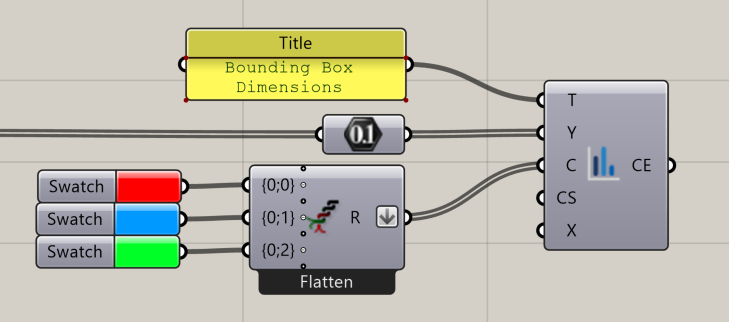
📂 Component Location
Tab: 3. Charts
📝 Description
The Bar (B) component produces a bar chart dataset using Y-values (heights), optional X-values, custom colours, and optional advanced dataset overrides via JSON. The output is a Chart Element (CE) that can be assembled into a mixed chart.
📁 Example File
🔌 Inputs
| Abbrev. | Full Name | Type | Description |
|---|---|---|---|
| T | Title | Text | Dataset label displayed in the chart legend. |
| Y | Y | Number | List of Y-values (bar heights). |
| C | Colour | GH Colour | Optional bar colour (RGB). |
| CS | Custom Settings | JSON | Advanced: overrides dataset options using JSON. Ref: https://www.chartjs.org/docs/latest/charts/bar.html |
| X | X | Number | Optional list of X-values. If omitted, index positions are used. |
🔄 Outputs
| Abbrev. | Full Name | Type | Description | Suggested Connections |
|---|---|---|---|---|
| CE | Chart Element | InForm Bar Chart | Bar chart dataset for InForm | Connect to Assemble Chart (AC) in 3. Charts to display the chart in InForm |